Automatic Invoice Forwarding
to QuickBooksor your Accountant
Connect your inbox and get a clear view of every invoice you've received — what's ready to forward, what needs a portal download, and what needs your review. Forward with one click, or set up auto-forwarding so you never deal with those emails again.
Just $10/month
5 minute setup
Cancel anytime
Set up once, never think about it again
All your invoices, organized.
See what's ready to forward, what needs a download, what needs review
Forward or automate — your choice.
One click to forward. One click to set up auto-forwarding.
Future invoices, handled.
Auto-forwarded invoices go straight to your accountant. The Action Center catches the rest.
Your Inbox
AmazonReceipt for order #123-456
Found!
StripePayment invoice - Nov 27
Found!
NewsletterWeekly digest...
IgnoredLinearTeam plan receipt - Dec
Found!
CalendlyPro plan invoice
Found!
GitHubPro subscription invoice
Found!
PromoBlack Friday sale...
IgnoredAdobeCreative Cloud receipt
Found!
FigmaTeam plan invoice
Found!
GCPMonthly invoice #4521
Found!
OpenAIChatGPT Plus receipt
Found!
VercelPro plan receipt
Found!
SocialNew follower alert...
IgnoredNotionTeam billing receipt
Found!
SlackWorkspace invoice
Found!
ZoomPro subscription
Found!
AmazonReceipt for order #123-456
Found!
StripePayment invoice - Nov 27
Found!
NewsletterWeekly digest...
IgnoredLinearTeam plan receipt - Dec
Found!
CalendlyPro plan invoice
Found!
GitHubPro subscription invoice
Found!
PromoBlack Friday sale...
IgnoredAdobeCreative Cloud receipt
Found!
FigmaTeam plan invoice
Found!
GCPMonthly invoice #4521
Found!
OpenAIChatGPT Plus receipt
Found!
VercelPro plan receipt
Found!
SocialNew follower alert...
IgnoredNotionTeam billing receipt
Found!
SlackWorkspace invoice
Found!
ZoomPro subscription
Found!
Your Accountant32 invoices sent
QuickBooks · Xero · ExpensifyFreshBooks · Wave · Dext ...15 invoices synced
How It Works
Get started in three steps
Connect your inbox, scan for invoices, and start forwarding.
01
Connect Your Inbox
2 minutes
Sign in with your email provider and enter your accountant's email address (or your bookkeeping software's receipt address, like QuickBooks or Xero).
02
Scan Your Inbox
A few minutes
Run a scan to find invoices already in your inbox. Every invoice is categorized by status — ready to forward, needs a portal download, or needs your review.
03
Forward and Set Rules
Your choice
Forward any invoice with one click. Want to auto-forward a specific invoice next time it arrives? One click to create a rule. From now on, those invoices go straight to your accountant.
See It In Action
Built for real workflows.
Every screen designed to save you time and mental energy.
app.expensent.com
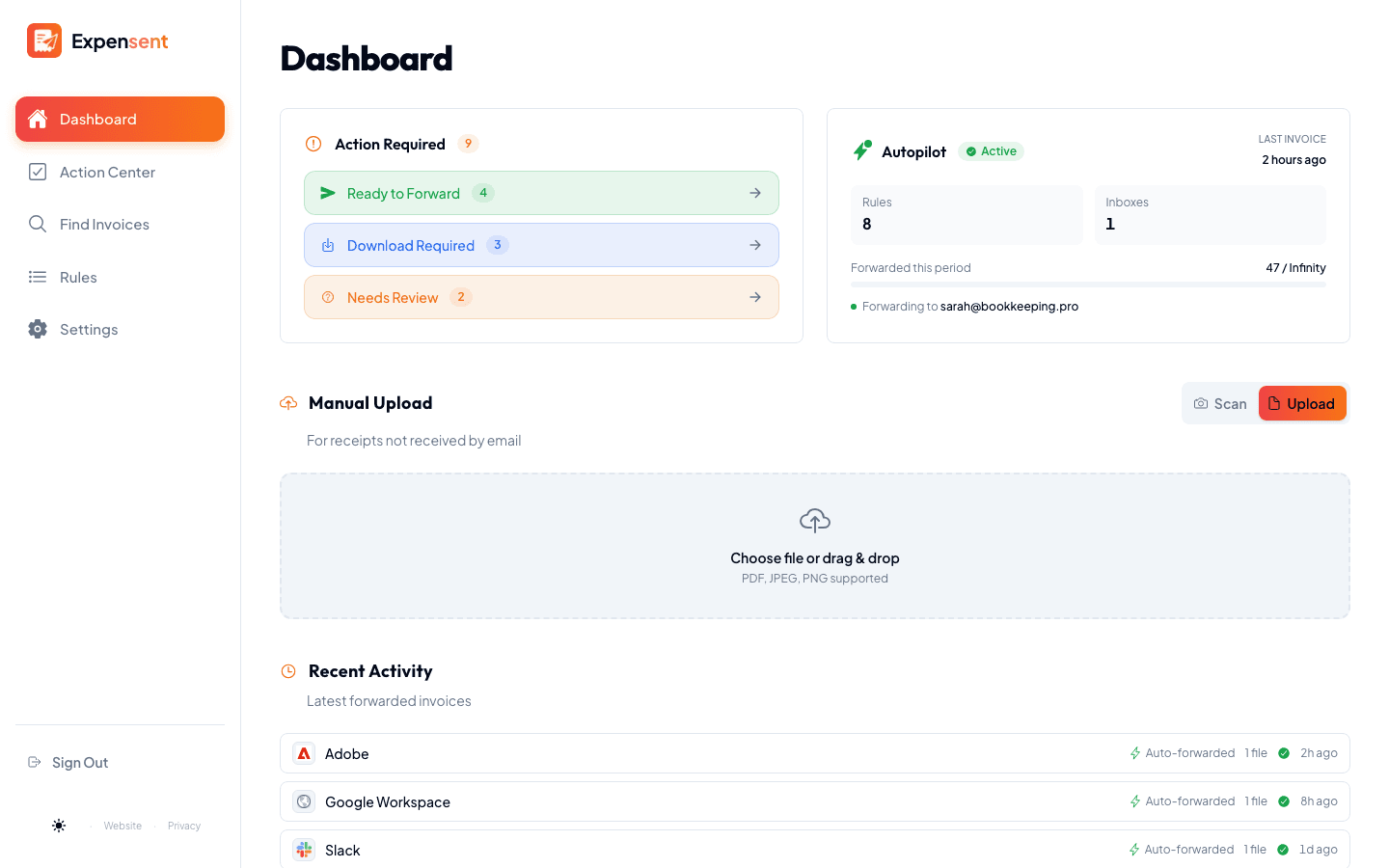
Your Dashboard at a Glance
See everything that matters — recent invoices, forwarding status, and what needs your attention. One screen, zero clutter.
Your Privacy Matters
How We Access Your Email Data
Transparency is core to our service. Here's exactly what we do and don't access when you connect your inbox.
What We Access
- Invoice-like emails only
We find emails that look like invoices—from any vendor. AI checks sender and subject to detect them.
- Email metadata for matching
Sender address, subject line, and date to identify invoice emails accurately.
- Invoice attachments
PDF receipts and invoices attached to matched emails, which we forward to your accountant.
What We Never Access
- Personal email content
We check sender and subject lines to find invoices. We never read, store, or forward your personal email content.
- Your email password
We use OAuth 2.0—you authenticate directly with Google or Microsoft. We never see your password.
- Contacts, calendar, or other data
We only request email read access. No contacts, no calendar, no drive files.
OAuth 2.0 Authentication
Industry-standard secure login. Your password stays with Google or Microsoft—never shared with us.
Encrypted Connections
All communication happens over HTTPS. Your data is encrypted in transit and stored securely by our infrastructure providers.
Full Control & Deletion
Revoke access anytime from your email provider's settings. Request data deletion and we remove everything within 30 days.
5 minSetup Time
AnyVendor Works
24/7Inbox Monitoring
$10Per Month
How It Works
How invoices are detected and handled
AI finds your invoices without reading your personal emails. Here’s how.
Metadata-First Detection
AI checks the sender, subject line, and attachment names to identify invoices. Only emails that look like invoices get a closer look — your personal and work emails are never read.
Categorized by Status
Each invoice is sorted into one of three categories: ready to forward (has a PDF, JPG, or PNG attached), download from portal (you need to grab it from the vendor’s website), or needs review (ambiguous — you decide).
Auto-Forwarding Rules
When you see an invoice you want auto-forwarded, one click creates a rule. The rule matches on sender and subject — so only that specific invoice type is forwarded, not every email from that sender.
Packed With Power
More than just forwarding.
AI-powered features that make invoice management effortless—from scanning paper receipts to extracting prices from PDFs.
AI Intelligence
Let AI do the heavy lifting
AI Price Extraction
Automatically reads your PDF invoices and extracts the amount, currency, and recipient. No manual data entry—prices appear right in the Action Center.
Automatic Currency Conversion
Set your accounting currency once. When an invoice is in a different currency, the converted amount is shown alongside the original — so your accountant sees both the original price and the value in the currency they work with.
Smart Document Classification
AI identifies each attachment as an invoice, receipt, credit note, statement, or delivery note. Filter by type so your accountant only gets what they need.
Smart Controls
Fine-tune what gets forwarded
Attachment Filters
Choose which document types to forward per forwarding rule. Auto-send invoices but skip marketing PDFs or account statements.
Batch Forwarding
Found 50 invoices from last quarter? Select all and forward them in one click. No more one-by-one tedium.
Skip $0 Invoices
Some vendors send $0 confirmations or free-tier receipts. Auto-skip zero-amount invoices so they don’t clutter your queue.
Team & Accountant
Keep everyone in the loop
CC Your Team
Add CC recipients to every forwarded invoice. Keep your bookkeeper, business partner, or yourself in the loop automatically.
Custom Reply-To
Set a reply-to address on forwarded emails so your accountant can respond directly to you—not to the system.
Vendor Notes
Add notes per forwarding rule that get included in forwarded emails. "This is our hosting bill" or "Deduct under office expenses."
Mobile & Connectivity
Manage invoices anywhere
Mobile Receipt Scanner
Snap a photo of any paper receipt with your phone camera. Built-in edge detection, flash control, and auto-crop—then send it straight to your accountant.
Any Email Provider
Gmail, Outlook, iCloud, Yahoo, Fastmail, ProtonMail—if it supports IMAP, it works. Connect any email account.
Works on Your Phone
Install as a mobile app—no app store needed. Manage invoices, upload receipts, and check your Action Center on the go.
What to Expect
Every invoice scenario, covered
Here's what your invoice workflow looks like once you're set up.
Invoices with auto-forwarding rules
Your AWS bill arrives on the 3rd. Your Figma invoice on the 15th. Because you set up rules, these go straight to your accountant the moment they land in your inbox. You don’t see them, touch them, or think about them.
Invoices without rules
A new vendor sends you an invoice for the first time — or an existing vendor sends an unusual email. These appear in your Action Center. Forward with one click, or create a rule so it’s automatic next time.
"Download your invoice" emails
Some vendors email you about an invoice but don’t attach it — they link to their portal instead. These are categorized as "download required" so you know to grab the PDF yourself, then upload it to forward.
Vendors that don’t email invoices at all
Some vendors never send invoice emails — you have to remember to log in and download them. Set up a monthly reminder so you don’t forget. When it’s time, download the PDF and upload it to forward.
☕ Simple Pricing
Choose Your Plan
Less than a coffee per week. Peace of mind that lasts forever.
5 minute setup
Cancel anytime
Secure payments via Stripe
Questions?
Frequently Asked
Do I really never have to think about it again?
That's the goal. Once connected, every invoice from your inbox is found and categorized. Forward with one click, or set up auto-forwarding — next time that invoice comes in, it goes straight to your accountant. The Action Center shows exactly what's been handled. For vendors that don't email invoices (portal-only), you can set reminders so nothing falls through the cracks.
What about vendors that don't email invoices?
Some vendors only let you download invoices from their website—no email. For those, you can set up recurring reminders in Expensent. We'll nudge you when it's time to download, and you can upload them to the Action Center.
Is my email safe?
Completely. We use OAuth 2.0 (never see your password) and bank-level encryption. AI checks email metadata first to find invoices—only those get a closer look. Your personal emails are filtered out without their content ever being read.
Why $10/month?
As a freelancer, one missed deduction costs more than a year of Expensent. $10/month is an easy write-off that pays for itself by ensuring you capture every business expense.
What vendors does it work with?
Any vendor that sends invoice emails—GCP, Vercel, Figma, Adobe, and thousands more. For vendors that only have portals, set up a reminder and upload manually when needed.
Can I cancel anytime?
Of course. No contracts, no commitments. Cancel whenever you want from your settings.
Stop thinking about invoices.
Start forgetting about them.
5 minutes to set up. Email invoices auto-detected and forwarded. Reminders for portal vendors. Action Center to track everything.
Set It Up OnceJust $10/month
5 minute setup
Cancel anytime